About
Ibid is a snake video game for DOS that I wrote in 1994. In each level, the player controls a constantly moving worm—rather than a snake—collecting randomly placed diamonds while avoiding walls and the worm’s own tail. Since each diamond makes the worm longer, the challenge increases as play continues. Once the player collects a level’s diamond quota, an exit door appears at a random location, opening the way to the next level.
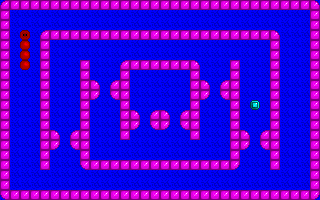
Later levels introduce additional obstacles and mechanics, including paired portal doors, one-way passages, and passages that open and close. Players who complete all 50 levels are rewarded with a winning scene.
Press the Play button below to launch a desktop browser port of Ibid and see how far you can get.
Origin
I wrote Ibid during my sophomore year of high school on a Gateway 2000 486 50 MHz desktop PC. I released it as shareware in February 1994, distributing it through dial-up bulletin board systems. I asked players who enjoyed the game and wanted to keep it after a 30-day trial period to send a pay-what-you-want contribution to support continued game development, with $10 recommended; in return, they would receive an official registration certificate. I do not recall a single check ever arriving in the mail.
As for the name, I had stumbled across “ibid.” while looking at a list of references. The word is an abbreviation of ibidem, Latin for “in the same place,” and is used in citations to refer back to the previously cited source. I liked the way it sounded: short and bouncy. For some reason, it made me think of an inchworm, which folds itself as if it had a joint in the middle. That image fit the game: the player controls a worm that bends and twists its body as it grows.
The summer before I wrote Ibid, I obtained a copy of Borland Turbo C++ 3.1 for DOS, along with a stack of programming books, and set out to learn C and C++ with the primary goal of writing video games. But the shareware catalog I included with Ibid shows that I was working on more than games under the label Birken Software, a company appellation I took from my last name.
Among the other programs I created was the Super Delete Utility, which overwrote files with random data to prevent undelete tools from recovering sensitive information. I wrote a terminate-and-stay-resident (TSR) program called Friction, designed to slow down faster computers so older games could run properly. It was the software equivalent of the Turbo buttons commonly found on PCs of the era. Friction was included as part of a TSR Tutor Pack, which provided explanations and a library to make writing TSR programs easier. I also wrote a program that converted PCX image files into executable slide shows, a mouse-support library for DOS applications that included user interface elements, and a screen saver inspired by the famous flying toaster screen saver, except mine featured flying purple rhinoceroses and Swiss cheese.
Ibid itself was inspired by Nibbles, the QBasic snake game included with MS-DOS 5.0. I even borrowed the blue background and pink walls. But instead of using text mode, I drew a VGA tile set in Pictor Paint, giving Ibid its own look while building on the simple, addictive idea of guiding a growing worm through increasingly difficult levels.
In 1996, during my freshman year of college, I ported Ibid to Java and hosted the applet on my student web page. It used the original graphics and levels, but left out the sound effects and ending animation. It also ran at the original 320×200-pixel resolution, which made it appear tiny inside a web browser. I did not know how to scale it up at the time.
From there, development ceased. As I upgraded from one computer to another over the next few decades, the original C source code, the Java source code, and the compiled Java applet were all lost to time. The only version that remained was the DOS shareware release I had sent out into the dial-up BBS ether years earlier.
Rediscovery
About 25 years later, my interest in lost media led me back to Ibid in a way I never expected. A Reddit thread on r/tipofmyjoystick, posted on July 5, 2021, was trying to identify a half-remembered DOS snake game that two brothers had played on school computers in Mexico sometime between 1996 and 2000. They remembered the name as something like “Ibid,” along with the red snake, blue background, purple walls, green collectibles, doors, teleporters, one-way passages, and the way collecting all the items opened the exit to the next level.
The mystery was later featured in a Whang! video about lost media, posted on September 28, 2021, where Ibid was described as “the most mysterious” game in the episode. Viewers and commenters compared the description to games like Nibbles and Nibbly ’96, but nothing quite matched the open levels and unusual mechanics they remembered.
After I saw the Whang! video, I followed the trail back to the Reddit thread and replied as the original author, confirming that the game was Ibid, a DOS shareware game I wrote in high school in 1994. I also pointed readers to a copy of the game on old-games.org, a Hebrew old-games site where Ibid had apparently been sitting untouched in a forgotten corner of the Web for years.
The renewed attention led to the game being preserved more formally. After I confirmed the game, another user asked for permission to upload it to Archive.org, and I agreed. It has been there since October 1, 2021.
Whang! later shared these developments in a follow-up video, uploaded on March 16, 2022.
Seeing Ibid remembered, identified, discussed, and preserved after so many years was surreal. The original mystery came from players who remembered it on school computers in Mexico, and another commenter later described playing it in Belgium at their grandfather’s house. The rediscovery revealed that my little shareware game had traveled farther than I ever imagined.
Restoration
A few years later, on July 5, 2024, someone on the Reddit thread reported that they could not get past level 34. Their screenshots showed that level 33 appeared partially corrupted, while level 34 had become a solid wall of blocks, making it impossible to complete.
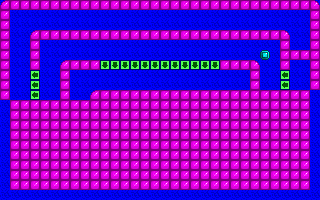
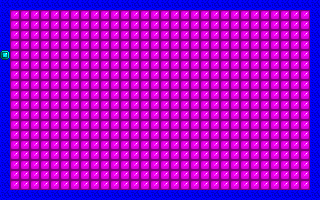
That discovery changed the preservation story. Ibid had been found, but the commonly available copy was damaged. After some searching, I found an uncorrupted version on Archive.org as part of the Total DOS Collection.
With the source code long gone, I decompiled the DOS .EXE binary and reverse-engineered the game back into C, reconstructing a new version that can be compiled with Borland C++ 3.1 for DOS and run inside DOSBox-X. I also used the recovered logic and data to create a desktop browser port that is faithful to the original.
Repo
The project is stored in the meatfighter/ibid repository. It is organized into four main directories:
dos-original: the original DOS shareware releasedos-reconstruction: the reverse-engineered C reconstructionweb-port: the web portweb: this web page
Building
The reconstructed C version lives in the dos-reconstruction directory. That directory contains the recovered source code, the original runtime data files, and the build scripts needed to compile a new DOS executable.
To rebuild the DOS version from a DOSBox-X command prompt, change into dos-reconstruction and run:
BUILDBUILD.BAT assumes Borland C++ 3.1 for DOS has been installed in C:\BC. The script sets the required PATH, INCLUDE, and LIB environment variables, clears the build directory, compiles the reconstructed source files, writes the new IBID.EXE into build, and copies the required runtime data files into that same directory.
The build uses REL.RSP, a Borland C++ response file containing the release compiler and linker options. It builds a DOS executable with the small memory model, targets 80386 instructions, enables Borland’s “Fastest Code” optimization bundle, omits floating-point support, disables stack-overflow checks, strips debug and line-number information, disables precompiled headers, and compiles with NDEBUG defined.
The new IBID.EXE is 26,600 bytes, while the original IBID.EXE is 46,536 bytes. The original executable contains debug information that should have been stripped before distribution, which bloated the file. The reconstructed build explicitly removes that information.
Technical Details
For readers who want to dig into the reconstructed C source code, this section explains the main technical details.
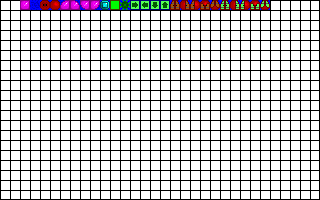
Ibid runs in VGA mode 13h, a 320×200-pixel graphics mode with a 256-color indexed palette. The game builds both the playfield and the worm itself from a 32×20 grid of 10×10-pixel tiles.
SCR
Ibid uses SCR files for full-screen indexed VGA artwork. These resources provide the logo screen, title screen, gameplay tile sheet, and winning-scene background.
File Format
Ibid stores full-screen 320×200 indexed VGA images in a proprietary SCR (“screen”) format. Each file contains compressed pixel data and its own 256-color palette. The compression uses the same basic run-length encoding (RLE) scheme as 8-bit PCX files.
Each SCR file has three parts:
- A compressed pixel stream
- A 768-byte palette block, equal to
256 × 3RGB bytes, beginning atEOF - 769 - A trailing
00byte
The SCR loader expands the pixel stream until it has produced exactly 320 × 200 = 64,000 output pixels. Decoding follows these rules:
- If
byte < 0xC0, emit that byte as a single pixel. - If
byte >= 0xC0, computecount = byte - 0xC0, read the next byte, and emit that valuecounttimes.
A byte value of 0xC0 would produce a repeat count of zero, making it effectively reserved or invalid in practice.
The palette block contains 256 consecutive RGB triples. For each palette entry, the loader reads R8, G8, and B8, converts each 8-bit component to VGA DAC precision with component6 = component8 >> 2, and writes the resulting values to the matching VGA palette slot.
The loader applies the palette when it writes the decompressed image to VRAM, and even when it writes the image to a conventional RAM buffer.
Files
BINTRO.SCR stores the Birken Software logo screen. The game loads it directly into VRAM at startup. The image’s palette initially defines all of its colors as black, which prevents the player from seeing the image being progressively decoded from disk. The game then fades the logo in and out by adjusting the palette.

IBID.SCR stores the Ibid title screen. The game loads it into a RAM buffer first, then copies the completed image to VRAM, allowing the title screen to appear all at once. After waiting for a keypress, the game clears both the screen and the buffer.

Those opening screens mattered to me because they made Ibid feel more like a real published game. During the early home-computing era, many hobbyists wrote simple BASIC games or typed them in from books and magazines. Those games usually lacked the presentational touches I associated with commercial games: a company logo, a polished title screen, a copyright notice—a sense that the game was introducing itself before play began.
I also loved watching the attract modes of arcade games. To entice players to insert a coin, an arcade cabinet would cycle through its company logo, title screen, copyright notice, intro animations, and a gameplay demo. I wanted Ibid to have that same ritual: the logo, then the title screen, then the game.
My logo came from a strange bit of arcade-game inspiration. In the Final Fight arcade game, the “barbecue” health item is a cylinder of roasted meat with a bone through it.

I reimagined that as a cartoon hambone. I also kept the idea of vitality in the back of my mind: playing my games would make you stronger.
After those introductory screens, the remaining SCR files serve more directly as game assets. OBJECTS.SCR stores the tile sheet. The game loads it into a buffer, then copies the 10×10-pixel tile graphics into a cache for use during gameplay.
GROUND.SCR stores the background for the winning-scene animation. The game loads it after the player completes the final level, then copies the image into two full-screen back buffers used by the animation.

CLP
Ibid uses CLP files for sprites with fully transparent regions. The game uses the format only in the winning-scene animation.
File Format
CLP (“clip”) is a precompiled sprite format designed for efficient software rendering. In VGA mode 13h, there are no hardware sprites. Every moving object has to be drawn in software over a background image.
A naive transparent-sprite renderer would examine every pixel in the sprite’s bounding rectangle, check whether that pixel is transparent, and then either skip it or write it. That means every pixel incurs a source read, a conditional test, address arithmetic, and loop overhead.
CLP moves that work into the format itself. It stores a command stream that describes where visible spans begin and end, plus a separate visible-pixel stream containing only the pixel bytes that actually need to be drawn. During rendering, long transparent regions collapse into a single skip command, while long visible regions can be copied with an efficient block memory transfer.
A CLP file consists of four parts:
- A 6-byte header
- A command stream
- A visible-pixel stream
- A 4-byte footer
Here is the byte layout:
| Offset | Size | Meaning |
|---|---|---|
0..1 | 2 | Flags |
2..3 | 2 | Width, little-endian |
4..5 | 2 | Height, little-endian |
6..(6 + command_stream_size - 1) | Variable | Command stream |
| Following bytes | Variable | Visible-pixel stream |
EOF - 4 .. EOF - 3 | 2 | command_stream_size, little-endian |
EOF - 2 .. EOF - 1 | 2 | visible_pixel_count, little-endian |
The CLP loader ignores the first two bytes of the file. Based on the existing files, however, 0x0101 may indicate that the sprite contains transparent regions, while 0x0000 may indicate a fully solid sprite. This flag has no effect on the existing renderer, but an optimized renderer could have used it to draw fully solid sprites faster.
The CLP renderer interprets the command stream one scanline at a time. It supports three commands:
0, N— drawNvisible pixels from the visible-pixel stream at the currentxposition.1, N— skipNtransparent pixels at the currentxposition.2— resetxto0and advance to the next scanline.
Each run-length N is stored in one byte, so a single draw or skip command can cover at most 255 pixels.
When the game positions a sprite partially offscreen, the CLP renderer clips the sprite while walking the command stream one scanline at a time. The renderer ignores runs on scanlines above or below the screen, and it trims runs on visible scanlines against the left and right screen edges before copying their visible pixels.
Files
Ibid uses CLP files only for the winning-scene animation.
BALL1.CLP stores a plain worm body segment, and BALL2.CLP stores the worm head.


The ending message is split across MESS1.CLP and MESS2.CLP, though it is not clear why.

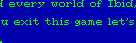
Rendering
After the player completes the final level, Ibid loads the winning-scene background (GROUND.SCR) into two full-screen buffers. One buffer serves as the clean background reference. The other serves as the compositing buffer where each animation frame is assembled.
The winning-scene animation uses three CLP sprites layered together to resemble the worm moving around the screen. For each frame, the game first repairs the compositing buffer by copying only the affected sprite-sized rectangles from the clean background buffer. This restores the areas where sprites appeared in the previous frame without copying the entire background image again.
After those regions have been restored, the game draws the sprites into the compositing buffer at their new positions and in the proper layered order. It then copies the completed compositing buffer to VRAM, presenting a finished frame to the player.
The compositing buffer matters because drawing the animation directly to visible video memory would expose the intermediate steps: erased rectangles, partially restored background, and sprites appearing one at a time. That would create visible flicker. By assembling the frame offscreen first, Ibid shows the player only the completed result. The clean background buffer makes the process efficient because the game can patch only the areas disturbed by the moving sprites instead of rebuilding the whole screen.
Performance
The CLP renderer relies on Borland’s _fmemcpy function to blit each visible span of pixels. When I decompiled _fmemcpy, I found that the routine uses REP MOVSW for the bulk transfer and then uses a single MOVSB when the span has an odd trailing byte.
REP MOVSW performs a stream of 16-bit transfers, and those transfers are most efficient when both the source and destination addresses are word-aligned. If either address begins on an odd byte, a single logical word transfer can straddle a natural word boundary. The processor still completes the copy correctly, but the memory system may have to split that word into multiple bus accesses, increasing transfer latency and bus traffic. Borland’s _fmemcpy does not test for alignment before entering the loop; it starts REP MOVSW at whatever far addresses it receives and continues until fewer than two bytes remain.
A custom sprite blitter could take advantage of information that _fmemcpy does not have. The CLP renderer knows that it is copying visible pixel spans, that the copies do not overlap, and that some spans may be long enough to justify a more specialized path. If the source and destination addresses began at the same offset within a 4-byte boundary, the renderer could copy a few leading bytes until both addresses became 4-byte aligned, then use REP MOVSD for the main body of the span. If the addresses did not line up that way, the renderer could choose another strategy, such as favoring aligned destination writes, using a word-copy path, or falling back to a byte path for short spans.
The benefit would have depended heavily on the destination. Copies between conventional RAM buffers would have been the clearest candidates for a faster 386/486-specific routine. Copies directly into VGA memory are harder to predict. In mode 13h, framebuffer writes go through the video card and bus rather than normal cached system RAM. On some systems, especially with 16-bit VGA paths or wait-stated video memory, the bus could dominate the transfer cost enough that wider CPU instructions would not produce a proportional speedup.
The decompilation shows that Ibid’s CLP renderer delegated visible-span copying to a safe, general-purpose runtime function rather than to a custom blitter tuned for sprites, VGA memory, and 386/486-era hardware. The CLP format reduced transparent-sprite rendering to a sequence of visible span copies, but the final transfer step remained limited by Borland’s conservative _fmemcpy implementation.
A more advanced approach could have used an unchained 256-color mode, such as Mode X or a related 320×200 variant, to gain access to additional video-memory pages. Instead of keeping the clean background and compositing buffer in conventional RAM, the renderer could have kept them in offscreen VRAM. Each frame could restore the sprite-sized background rectangles from a clean VRAM page into a working VRAM page, draw the sprites into that working page, and then flip the completed page to the display.
This would not have been a simple substitution. Mode 13h gives each pixel a straightforward linear address. Unchained VGA modes divide pixels across planes, requiring plane selection, different address calculations, and more careful drawing code. A VRAM-based renderer would also need to manage video-memory pages explicitly: which page was visible, which page was being composed, where the clean background lived, and which graphics had already been uploaded to offscreen memory. It could have reduced some conventional-RAM-to-VRAM traffic, but it would have required a much more sophisticated VGA renderer than I knew how to write at the time.
Lost Potential
I created the CLP format with more ambitious games in mind. I wanted to make a Super Mario Bros.-style platformer. I also wanted to create point-and-click adventures that resembled Sierra games.
I built prototypes around those ideas, but I never completed a full game. In Ibid, the winning-scene animation became the proof of concept. It uses CLP sprites for the bouncing and crawling worm segments, as well as the message panels, demonstrating that the game could draw moving images with transparency over a background.
In that sense, the finale was more than just a reward for finishing the game. It was a glimpse of the larger sprite system I had hoped to use in future projects that never came to be.
LEVELS.DAT Format
LEVELS.DAT stores the game’s 50 levels. Each level occupies a 649-byte record:
| Offset | Size | Description |
|---|---|---|
0..639 | 640 | 32×20 tiles, stored row-major |
640 | 1 | start_x |
641 | 1 | start_y |
642 | 1 | required_diamonds |
643 | 1 | has_portal_pair |
644 | 1 | portal_a_x |
645 | 1 | portal_a_y |
646 | 1 | portal_b_x |
647 | 1 | portal_b_y |
648 | 1 | initial_direction |
One small inefficiency comes from how I represented the board in memory. The file stores the level data row-major, but the game stores the runtime board as board[x][y], column-major in memory. As a result, the loader transposes the level data as it reads it. That layout also makes later tile access less cache-friendly than it could have been.
The tile block contains 14 stored tile types. When the loader reads a level record, the game first copies the raw 32×20 tile IDs into board[x][y]. It then walks the grid again and uses each stored ID for two purposes. First, the game renders the corresponding 10×10 tile graphic to VRAM from the cached OBJECTS.SCR tile set. Second, the game rewrites board[x][y] into a normalized runtime value used by the game logic.
In other words, the serialized tile ID does not always match the in-memory tile ID. The runtime board stores behavioral categories such as solid wall, empty background, one-way arrow, and toggle barrier, along with dynamic states such as diamonds, portal doors, and the exit door.
The table below shows how the stored tile types map to their in-memory counterparts:
| Stored | In-memory | Description |
|---|---|---|
0 | 1 | Square wall |
1 | 0 | Traversable background |
2 | 0 | Worm start |
3 | 1 | Top-left rounded wall |
4 | 1 | Top-right rounded wall |
5 | 1 | Bottom-left rounded wall |
6 | 1 | Bottom-right rounded wall |
7 | 7 | Unused |
8 | 9 | Red/green barrier |
9 | 6 | Right arrow |
10 | 5 | Left arrow |
11 | 8 | Down arrow |
12 | 7 | Up arrow |
13 | 13 | Portal door |
Unused tile 7 corresponds to an unused graphic in OBJECTS.SCR that resembles a green turtle shell with eight legs.

The recovered code contains no remnant logic suggesting what the tile was meant to do, leaving only speculation. I may have intended it to be a hidden explosive mine that appeared only when the worm approached. It may also have been meant as a moving enemy. Unfortunately, I no longer remember what I had planned for it, or why I never implemented the feature.
Portal door tile 13 repeats information already stored in the level metadata. However, the tile grid provides the initial door artwork during the render pass, while the level header supplies the semantic pairing information. The level loader then patches those two cells into live runtime portal states.
The runtime board also uses additional values absent from the serialized level records:
2: diamond3,4: live portal endpoints patched from metadata18: exit door spawned dynamically19..22: portal traversal states23..26: one-way traversal states
The game does not store the exit door’s position in the level file. Rather, the game places the door randomly after the player collects the required number of diamonds.
The game controls the red/green barrier through a global VGA palette change, not by swapping tile graphics.
Secret code numbers
Ibid does not store its secret code numbers in LEVELS.DAT or in a lookup table in the source code. Instead, the game generates each secret code number deterministically from the level number using the same pseudo-random sequence every time.
The recovered logic seeds the random-number generator with 0x1399, then advances the sequence once for each level until it reaches the requested level:
srand(0x1399);

for (i = 0; i < level_number; ++i) {
    code = random(0x7D96);
}
The algorithm passes 0x7D96 (32150) as the range limit to random().
When the player requests level 1, the game uses the first bounded random value after seeding. When the player requests level 50, the game uses the fiftieth bounded random value. Because the seed and range remain fixed, each level always maps to the same secret code number.
The full set of secret code numbers is listed below.
- 1696
- 231877
- 316022
- 427037
- 523428
- 612765
- 714773
- 824726
- 918412
- 1023812
- 1130724
- 1221570
- 136337
- 1411264
- 1530917
- 1619507
- 1712510
- 1820848
- 1929124
- 209780
- 211581
- 2219380
- 2329385
- 2421013
- 258492
- 2621374
- 2726639
- 289625
- 2914551
- 3017278
- 317157
- 3229596
- 331648
- 3419829
- 354046
- 369468
- 3722866
- 3814517
- 3921956
- 4023725
- 4115194
- 422051
- 4314852
- 44591
- 4528500
- 4615256
- 4720318
- 4810607
- 4917771
- 508951
Timing
The recovered code also shows one of the biggest things I did not understand in 1994: how to make a DOS game run at a consistent speed across different PCs. Ibid does not use a fixed-rate game loop. Instead, the game advances play, draws the result, and then waits for a configurable delay before continuing.
That design explains why the main menu lets the player choose the worm speed. The setting does affect difficulty, but it also compensates for the reality of DOS gaming at the time: different computers could run the same program at very different speeds. The original instructions made that dual purpose explicit:
If you have a slow computer, select a fast speed. Choose a slow speed if you have a fast computer. Speed can also be changed to increase difficulty of the game.
On a faster machine, the same code could update more quickly unless the program used a reliable external timing source. The fastest speed setting in Ibid uses delay(0), which means the game runs as fast as the computer, memory, and video writes allow.
The ending animation has a similar dependency. Its timing comes partly from explicit delay calls and partly from the cost of drawing the animation on the original machine. In other words, some of the timing was not really designed at all; it emerged from how long the drawing work happened to take.
I also did not know how to synchronize drawing to the VGA vertical retrace, the brief interval when the CRT monitor has finished drawing one frame and the electron beam is returning to the top of the screen to begin the next one. A DOS program could poll the VGA status register and wait for that interval before updating video memory. That technique could reduce visible tearing because the program would be less likely to change the image while the screen was actively being scanned.
For a game as simple as Ibid, vertical retrace timing probably would have been enough on the VGA hardware I was targeting. The game could have waited for each retrace, counted frames, and advanced the worm every fixed number of retraces depending on the selected speed. That would have made the game far less dependent on CPU speed, as long as the machine could finish the required drawing work between updates.
That approach still would not have been perfect. It would have tied the game’s speed to the display refresh rate. On a typical VGA mode 13h setup, that likely meant about 70 updates per second, which would have been consistent enough for the PCs I was thinking about in 1994. On hardware, adapters, or later displays that presented the same mode at a different refresh rate, the game would have run proportionally faster or slower.
Other timing approaches were available. The BIOS time-of-day tick was easy to access, but its roughly 18.2 updates per second were too coarse for smooth arcade movement by itself. The programmable interval timer could have generated interrupts at a higher fixed rate, allowing the game logic to advance based on elapsed ticks rather than raw CPU speed or display refresh rate. A more robust game could have used a hardware timer for consistent game logic and vertical retrace for cleaner display updates.
Ibid did none of that. Its timing reflects how I understood programming at the time: write the game logic, draw the graphics, add a delay, and adjust the delay until it felt right on the machine in front of me. That was enough to make the game playable on my 50 MHz 486, but it left the original DOS version tied closely to the behavior of that era’s hardware.
Web Port
The web port does not emulate the DOS executable. Instead, it recreates Ibid from the recovered game logic, data, artwork, and audio of the original.
Font
The original game uses the standard VGA bitmap font for text in the main menu, the level interstitials, and the final THE END... message. To preserve that look, the web port loads a font sheet at startup. The sheet contains 256 8×8-pixel glyphs arranged by character code, and the port converts those glyphs into monochrome masks.
When the game draws text, it looks up each character, reads the corresponding 8×8 mask, and plots the active pixels in the requested RGB color. This keeps text placement, spacing, and appearance under explicit pixel control.
Indexed Color
The web port preserves the indexed-color structure of the original SCR artwork. When it decodes an SCR file, it keeps the image as palette indices plus a 256-color palette rather than treating it as a finished full-color bitmap. It also mirrors the DOS palette conversion, reducing the original 8-bit RGB components to VGA-style 6-bit precision before scaling them back to browser RGB values. This makes the displayed colors match what the VGA hardware would have produced.
Keeping the artwork in indexed form also makes it possible to reproduce the original palette tricks. In DOS, changing a VGA palette register changes the displayed color of every pixel that refers to that palette entry, without rewriting the image data. The web port recreates that behavior in different ways depending on what it needs to draw.
For the red/green barrier, the web port pre-renders two versions of the tile: one using the normal green palette, and one overridden to red.
The logo fade uses a different strategy because it has many brightness levels. The web port rebuilds the logo image for each frame in real time. Each rebuild uses the same source pixels, but substitutes the grayscale value for the current fade step before converting the indexed pixels to RGBA output.
For the final THE END... message, the font renderer redraws the message for each fade step using the current color from the fade ramp.
Timing
The DOS version and the web port regulate speed in different ways. In DOS, the game advances one step, draws the new state, and then calls delay() before continuing. The total pace therefore depends not only on the selected delay value, but also on how long the drawing work takes on the current machine.
The web port uses requestAnimationFrame as its presentation loop, but it tracks elapsed time separately. Gameplay advances through a fixed-step accumulator, and the worm moves only when the simulated DOS delay for the selected speed has elapsed. If rendering falls behind, the loop can process several gameplay steps in one browser frame. It also caps that catch-up work and discards any larger backlog rather than allowing timing drift to accumulate indefinitely.
Rendering
During gameplay, the original DOS version updates only the tiles that changed. The web port uses a simpler approach: it maintains a 320×200-pixel offscreen image and redraws the entire current game state into that image for each frame. It then scales the completed image and copies it into the visible browser area.
For the ending animation, the web port also uses the offscreen image directly. It redraws the background and sprites for each frame rather than reproducing the DOS version’s separate background and compositing back buffers.
Input
The original DOS version handles keyboard input inside the main game loop. For each gameplay update, the loop polls the keyboard, consumes at most one queued key event, and applies that event to the worm’s direction.
The web port separates event collection from event consumption. Browser keydown events can arrive at any time, independently of the game’s fixed-step update loop. The port listens for those events, filters out keys the game does not use, prevents browser default behavior such as scrolling, and stores the accepted keys in an input queue.
The fixed-step game loop then consumes that queue during gameplay updates. Each update removes at most one queued key event and applies it to the current game state. That keeps input handling tied to the simulated DOS update cadence rather than to the browser’s event timing.
Because the main menu relies on specific keyboard commands, I kept the interface keyboard-only, making the web port a desktop game.
Sound
The web port reconstructs the sound effects procedurally, but it does not synthesize them live at the instant each effect plays. At startup, the port generates sample buffers from the original tone sequences. Later, when the game needs a sound, it plays the already generated buffer.
For each tone, the generator converts the requested frequency into the pitch the PC speaker would actually have produced. The PC speaker was driven by the programmable interval timer, which divided a fixed base clock by an integer value. Because that divisor had to be an integer, the hardware could not produce arbitrary frequencies exactly. The DOS code requested a frequency, the timer converted it to a usable divisor, and the resulting tone was often a close approximation rather than the exact requested pitch. The web port preserves that behavior by computing the same kind of divisor and then deriving the quantized playback frequency from it.
The port synthesizes each tone as a square wave, matching the character of the PC speaker signal. It computes the number of output samples needed for the tone’s duration, advances a phase accumulator across the buffer, and writes either a positive or negative amplitude depending on which half of the wave cycle the phase currently occupies. The port then concatenates those square-wave segments into one generated sample buffer for each effect.